


My H-E-B
4.713.64K Reviews
App Specs
- Version
- 2.83.0.56
- Updated On
- License
- Free
- Downloads
- 1,000,000+
- Developer
- H-E-B
- Categories
- Shopping
- Platform
- Android, iOS
Screenshots
 Analysis by AppCompare
For shoppers who already rely on H-E-B, My H-E-B is most useful when it turns a vague grocery errand into a plan: decide what you need, check the offers, and choose whether to shop in person or arrange pickup. I find that planning is the app’s strongest idea. It can make a familiar weekly trip less scattered, though it is most valuable when H-E-B is already where you intend to shop.
A grocery routine, not just a digital flyer
My H-E-B is a free shopping app from H-E-B, designed around the practical decisions that come before and during a grocery run. Its mix of shopping lists, weekly deals, digital coupons, and pickup or delivery options puts several parts of that routine in one place. The app has a 4.7 average from around 42,000 ratings, and more than a million installs, suggesting it has found a substantial audience among shoppers looking for a store-specific tool.
I would not treat those figures as a promise that every part of the experience will suit every household. The app’s value depends on how often you shop at H-E-B and whether its ordering options fit your routine. If you mainly compare prices across multiple grocery chains, a retailer-specific app may be less convenient than a general list or comparison tool. But if H-E-B is your regular stop, keeping plans and store-related offers together can be genuinely handy.
The list is the part that can save a trip
Ever find yourself wandering the aisles of H-E-B, clutching a shopping list and hoping to make it out in record time? Well, guess what? There's an app for that! Enter My H-E-B, your trusty sidekick for all things grocery-related.
Getting to Know My H-E-B
First things first, let’s dive into what makes My H-E-B a must-have for anyone who shops at this beloved Texas grocery chain. This app is your one-stop shop for managing your grocery trips, whether you're a weekly planner or a last-minute dash-er. From creating shopping lists to navigating the store, My H-E-B has you covered.
Shopping List Magic
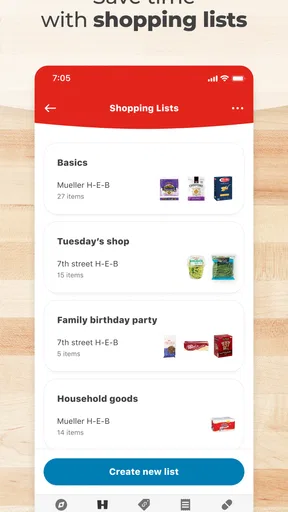
You know how shopping lists are—either you forget them at home, or you end up with scribbles you can't read. With My H-E-B, those days are over. The app lets you create and manage your shopping lists right from your phone. You can search for products, add them to your list, and even organize them by aisle. It’s like having a personal assistant who knows the layout of your local H-E-B better than you do!
The best part? You can share your list with family members or roommates. That way, everyone can add their must-haves, and you won’t be left with the "I thought you were getting the milk!" scenario.
Worth Reading Before You Choose

EA SPORTS FC Mobile 26 Is a Bigger Football Game, but It Takes Time

Flipboard Shows What News Apps Must Do Beyond the Feed

Switching to Android Auto Means Rethinking Your Driving Routine

Google Calendar Makes a Crowded Week Easier to Manage

Ludo King Makes the Most of the Minutes Between Plans

Baby Panda World Brings Quick Play to Modern Phones, but Its Game Library Feels Busy
A small change in how I use a list makes a noticeable difference: I add ingredients as soon as I realize they are running low, rather than trying to reconstruct the whole pantry before shopping. For a shared household, that turns the list into a running handoff between whoever notices a need and whoever makes the trip. It also helps separate essentials from “nice to have” items, so an improvised stop does not become a second full shop.
There is a trade-off to organizing by aisle. It can make an in-store visit more direct when the layout and product placement match what the app shows, but it still pays to keep the list readable and current. If someone adds an item after you have already passed its section, you may need to backtrack. I’d do one quick review before leaving home, especially when the list is shared, rather than assuming every addition is ready in the order you want to shop.
Deals and Discounts Galore
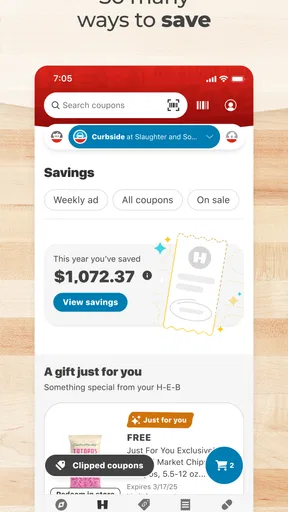
Who doesn’t love saving a few bucks? The app features a comprehensive list of weekly deals and digital coupons. As you browse through the app, you can easily add these discounts to your shopping list. The app will even remind you at checkout to use your digital coupons, ensuring you never miss out on savings.
The practical trick is to check offers while building the list, not after you have already decided what to buy. That makes it easier to notice a relevant deal without letting a discount dictate the whole basket. I would still compare the offer with what your household actually uses: a coupon only helps if the item fits the meal plan or replaces something you would have bought anyway. This is a more grounded way to use store promotions than browsing them as a reason to add extras.
Compared with a paper flyer, having weekly offers and coupons alongside a shopping plan can reduce the back-and-forth between separate tools. Compared with a general coupon app, the advantage is that the offers sit in the context of shopping at H-E-B. The limitation is the same: the savings are tied to that retailer, so they are less helpful if your best option for a particular item is elsewhere.
Order Ahead and Curbside Pickup
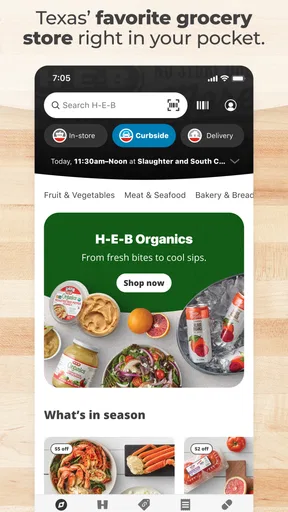
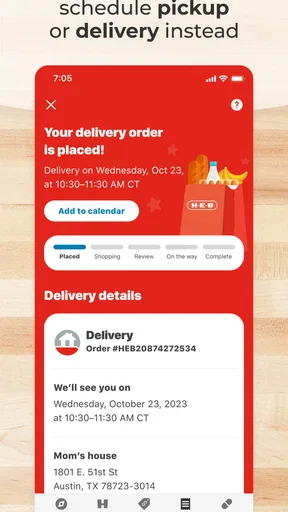
If you’re anything like me, the idea of skipping checkout lines is like music to your ears. With My H-E-B, you can place orders ahead of time and pick them up curbside. Just shop through the app, select a pickup time, and voila! Your groceries will be ready for you without having to step foot inside. It’s a game-changer for busy weeks or when you just want to avoid the crowds.
Pickup changes the useful question from “How quickly can I get through the aisles?” to “Is it worth having someone else assemble this order?” For a planned shop with familiar staples, ordering ahead can spare you the store visit. For a small top-up, an item you want to inspect personally, or a trip where browsing matters, going inside may be the better choice. I’d keep the list as the source of truth either way, then decide on the shopping method based on the errand rather than treating pickup as the default.
Delivery can suit a different kind of day: when getting to a store is the hard part, having groceries brought to you may be more valuable than saving time inside the shop. Pickup, by contrast, keeps the final handoff connected to your own trip. The app’s combination of these options is useful because it lets the shopping plan stay similar while the way you receive it changes. Which one makes sense depends on your schedule and the kind of order you are placing.
Finding Your Way
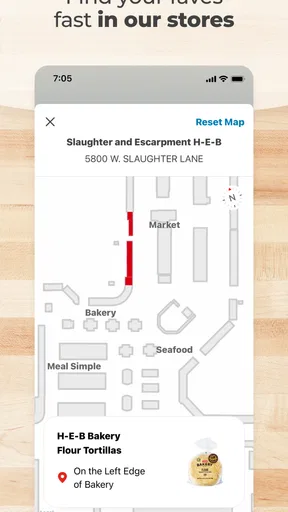
Ever get lost trying to find the quinoa or the elusive spices section? The app includes a store map feature that guides you through the aisles. Simply search for a product, and the app will show you its exact location in your local store. No more wandering aimlessly—unless, of course, you want to.
The map is most useful when you are in a store you know only moderately well, or when your list includes a few less familiar items. I would use it as a guide rather than a reason to plan every step with precision: stores can feel different when a section is busy, and a quick search is often more practical than repeatedly checking the screen. One efficient pattern is to look up unfamiliar products before setting off, then use the aisle-organized list to keep the rest of the trip moving.
Real-Time Inventory
Have you ever trekked all the way to the store only to find your favorite cereal is out of stock? The real-time inventory feature in My H-E-B helps you avoid such disappointments. Check product availability before you make your trip, ensuring you can plan your shopping with confidence.
Availability checks are especially helpful when an item is central to a meal or difficult to substitute. I would check those products before committing to a special trip, and keep a fallback in mind for less essential items. Inventory information can guide a decision, but it is sensible not to build an entire plan around one hard-to-find product. The app also provides product details such as ingredients and nutrition information, which can help when comparing options or checking whether a packaged food works for your needs.
That makes the app useful for more than speed. If you are shopping for someone with dietary preferences, checking product information while you make the list can narrow down choices before you reach the shelf. It is still worth reading the package when you buy, particularly if an ingredient matters a great deal, but having details available during planning can make the decision less rushed.
Where it fits among grocery options
The usual alternatives are a handwritten list, a notes app, a paper flyer, or the retailer’s own ordering tools. A plain notes app can be simpler if you shop at several stores or just need a shared checklist with no store-specific extras. A paper list works without opening a phone, but it cannot bring H-E-B offers, product searches, and ordering into the same routine. My H-E-B makes the strongest case when you want those store-linked tasks together, rather than when you need a universal grocery organizer.
For a realistic weekday example, imagine you are planning dinner after work and realize you are short on a few ingredients. You can add them to the running list, check whether a relevant coupon is available, and look up an unfamiliar product before heading out. If the evening is too packed for an aisle-by-aisle visit, you can instead consider ordering ahead. That is a sensible workflow because each feature answers a different question: what to buy, whether there is an offer, where to find it, and how to get it.
The app is less compelling if you rarely shop at H-E-B, prefer to choose every item in person, or want one tool that keeps plans across several retailers. It may also be more than you need for a very short trip where a few remembered items are enough. In those cases, a basic list can be quicker and less tied to one store. I see My H-E-B as a focused companion to regular H-E-B shopping, not a replacement for every grocery tool.
Who gets the most from it
My H-E-B is rated for Everyone, is free, and is developed by H-E-B. It was released on December 2, 2019, and version 2.78.1.1 is the current version; it requires Android 7.0 or later. Those details make it approachable for many Android users, while the main practical question remains whether H-E-B is already part of your shopping routine. The app’s features make the clearest difference for regular shoppers, households coordinating purchases, and people who switch between in-store shopping and ordering ahead.
For a shared household, I would agree on who is maintaining the list and use it as a single place to capture needs, rather than letting several separate notes compete. For someone who shops alone, the same list can act as a check before leaving and a record of what still needs attention. Either way, the benefit comes from a small habit: add items when they come to mind, then make a final pass before shopping.
One question worth settling before relying on pickup or delivery is whether that format suits the particular shop. A routine basket of familiar goods is easier to plan remotely than a trip where you want to choose produce or compare items on the spot. I would use the ordering option when convenience outweighs that hands-on choice, and walk the aisles when selecting items myself is part of the point. That flexibility is more useful than assuming one method is always best.
A Few Final Thoughts
All in all, My H-E-B is a powerhouse of convenience for anyone who frequents this iconic grocery store. From crafting the perfect shopping list to navigating deals and saving time with curbside pickup, the app streamlines your entire grocery shopping experience.
Whether you're a die-hard H-E-B fan or a newcomer to the Lone Star State, this app is bound to make your life a whole lot easier. Download it, give it a whirl, and you might just find yourself wondering how you ever shopped without it.
So, are you ready to transform your grocery trips from chaotic to calm? Go ahead, tap into the world of My H-E-B, and make every shopping journey a breeze!
Pros
- User-friendly interface for easy navigation.
- Personalized deals based on shopping habits.
- Seamless integration with curbside pickup.
- Real-time inventory updates for accuracy.
- Quick access to digital coupons and savings.
Cons
- Limited payment options available.
- Occasional lag in app performance.
- Inconsistent barcode scanning feature.
- Requires constant updates for optimal use.
- Notifications can be overly frequent.
FAQs for My H-E-B
What features does the My H-E-B app offer?
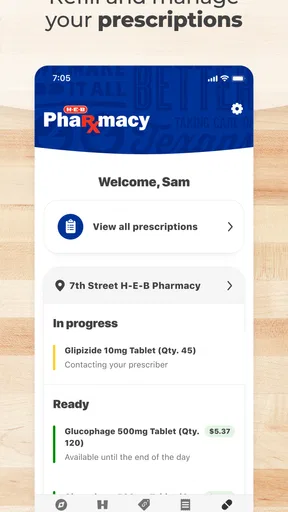
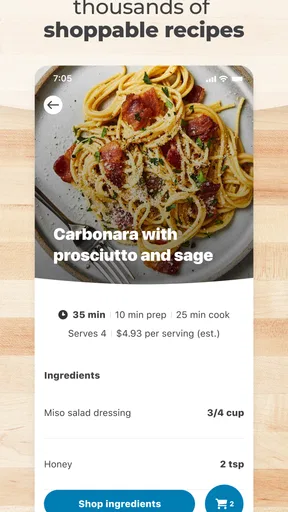
The My H-E-B app provides a comprehensive shopping experience with features such as digital coupons, grocery delivery or curbside pickup, and personalized shopping lists. Users can also explore weekly ads and browse recipes. The app's interface is user-friendly, ensuring easy navigation through various features to enhance your shopping convenience.
Can I use the My H-E-B app for online orders and delivery?
Yes, the My H-E-B app allows you to order groceries online for delivery or curbside pickup. You can choose a convenient time slot for your delivery or pickup, making it easy to fit into your schedule. The app ensures a smooth process, from browsing products to finalizing your order securely.
How do I apply digital coupons in the My H-E-B app?
Applying digital coupons in the My H-E-B app is straightforward. Simply browse the available coupons and add them to your account with a tap. At checkout, the app automatically applies eligible coupons to your order, ensuring you get the best deals without the need for physical coupons.
Is the My H-E-B app free to download and use?
Yes, the My H-E-B app is free to download and use. It is available for both Android and iOS devices. While the app itself is free, be aware that there may be delivery fees or minimum order requirements depending on your location and the services you choose to use.
How secure is my personal information on the My H-E-B app?
The My H-E-B app prioritizes user security by implementing robust security measures. Your personal information, including payment details, is protected through encryption and secure servers. The app also offers secure login options, ensuring that your data is safe while you shop online.


